Aeries Parent Portal
*Please note: this webpage contains links to external websites, and HUSD is not responsible for the content of external websites.
2026-2027 BACK-TO-SCHOOL PAPERWORK
Back-to-School paperwork for the 2026-2027 school year is now available.
As a reminder, you can access the Aeries Parent Portal at this link. If you need assistance setting up your Parent Portal, please contact Laurel Green ([email protected]).
BACK-TO-SCHOOL PAPERWORK INCLUDES:
PROOF OF RESIDENCY
We will be checking proof of residency for all HUSD families, as we do every year prior to school starting.
This year, this can be done by either dropping off a hard copy at the district office or (beginning on August 3rd) at your student's school office or by emailing digital copies to:
[email protected] for HES
[email protected] for HJH
[email protected] for HHS and MBA
Please note: For the 2026-27 school year, your student will not be able to receive their class schedule until all summer paperwork, including providing proof of residency, has been completed and received by the district.
Below, you will find step-by-step Instructions to complete HUSD's back-to-school paperwork:
NEW STUDENTS
Families with students new to the school should receive an email with the information required to create an Aeries Parent Portal account. If your student is new to the school, but you did not receive this information, please contact the school office beginning the week of August 3rd. You can also contact the district office prior to that.
TECHNICAL SUPPORT FOR FAMILIES
Technical assistance is available by contacting [email protected].
The Aeries Parent Portal is a student information system that allows parents to keep track of:
- Grades
- Attendance
- Updates to contact information
- Online registration
SUPPORT RESOURCES
Do you still need to create your Aeries Parent Portal? Use the following resources to learn how to access Aeries Parent Portal :
Via a computer:
- Written Directions / Explicación escrita
- Video Tutorial / Video (Este video es NADAMAS un EJEMPLO)
- Access Aeries Parent Portal here / el enlace.
HOUSEHOLD INCOME DATA COLLECTION
Information collected through the Aeries reregistration process is a confidential educational record and is therefore protected by all relevant federal and state privacy laws that pertain to educational records including, without limitation, the Family Educational Rights and Privacy Act of 1974 (FERPA), as amended (20 U.S.C. § 1232g; 34 CFR Part 99); Title 2, Division 4, Part 27, Chapter 6.5 of the California Education Code, beginning at Section 49060 et seq.; the California Information Practices Act (California Civil Code Section 1798 et seq.) and Article 1, Section 1 of the California Constitution.
Information collected through the Aeries reregistration process is a confidential educational record and is therefore protected by all relevant federal and state privacy laws that pertain to educational records including, without limitation, the Family Educational Rights and Privacy Act of 1974 (FERPA), as amended (20 U.S.C. § 1232g; 34 CFR Part 99); Title 2, Division 4, Part 27, Chapter 6.5 of the California Education Code, beginning at Section 49060 et seq.; the California Information Practices Act (California Civil Code Section 1798 et seq.) and Article 1, Section 1 of the California Constitution.
Why do we collect this data?
Household Income Data Collection helps HUSD collect important information that helps our schools and students in multiple ways:
Household Income Data Collection helps HUSD collect important information that helps our schools and students in multiple ways:
School Funding - Increased funding to ensure students receive the support they need at school
SAT, ACT, AP Fees - Discount on fees for academic tests
College Application Fees - Discount on fees associated with applying to college
Bus Passes - Discount on passes for the bus
Internet Access - Discount on home internet costs
BASIC SUMMARY OF AERIES GRADEBOOK:
On the right is your student's classes. On the left shows the grade your student has for that class. Click on the class for details.
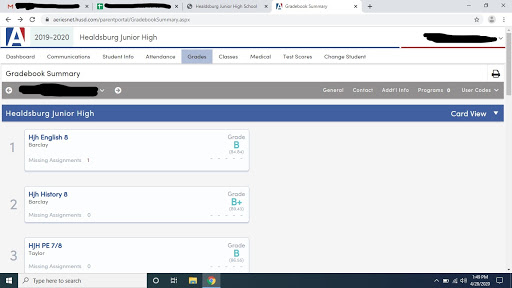
Clicking on one of your student's classes in the gradebook shows all assignments for the class.

BASIC SUMMARY OF ATTENDANCE:
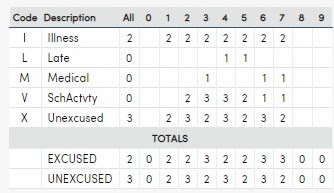
You also stay informed of your student's attendance. The attendance page on the parent portal will look similar to this image. There are 5 columns, one for each day of the week. One the right are the dates and on one (-) means the class periods. The codes are listed at the bottom of the page, along with an attendance summary.

Refer to the table at the bottom of the page to understand the attendance codes.